Existing customers order again without logging in
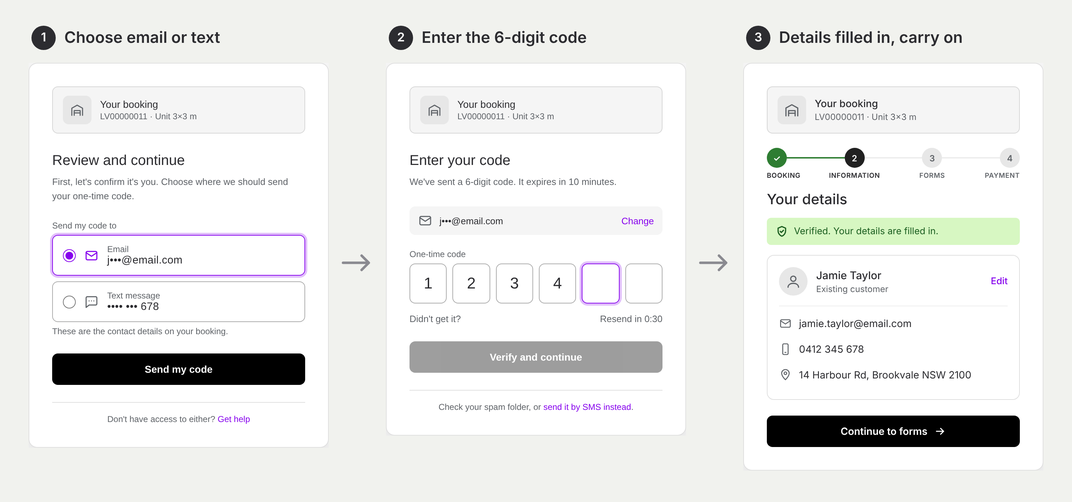
Returning customers no longer need a login or password to place a new order. Alyta sends a 6-digit code to the email or mobile already on their account, and entering it proves it's them. Their details fill in automatically and they carry on to checkout.
A returning customer who wants a second unit shouldn't have to remember a password they set a year ago. Login screens are where repeat orders stall: a forgotten password, a reset email that lands in spam, and a customer who gives up or rings the office instead.
What changed
Existing customers no longer log in to place a new order. When they start an order, Alyta confirms it's them with a one-time code sent to the email or mobile already on their account. There's no account to sign in to and no password to remember.
Why a code works instead of a password
A password is something the customer has to remember. A one-time code is something only they can receive. Because the code goes to the details already on their account, getting it proves who they are, the same job a password used to do. It also means no one can place an order under someone else's name.
How it works
- Choose email or text. Alyta shows the email and mobile on the account, partly hidden, and the customer picks where the code goes.
- Enter the 6-digit code. If it doesn't arrive, they can resend it or switch to the other option.
- Carry on to checkout. Their details are already filled in, so they go straight to choosing a unit and paying.
Built-in limits
- Each code works for 10 minutes. Customers can ask for a new one after 30 seconds, and the old code stops working as soon as they do.
- After three wrong codes the customer waits 15 minutes before trying again, with your phone number on screen if they need you.
When details are out of date
If an existing customer no longer has the email or mobile on their account, they tap Get help and see your phone number. Update their details in Alyta and they can finish their order. It's worth checking customer contact details are current so this rarely comes up.


